Showing posts with label convert decimal to binary. Show all posts

Exercise Decimal to Binary Conversion

In the tutorial How to Convert from Decimal to Binary Shortly & Efficiently?, we discuss how to convert binary to decimal easily. We also discuss the methods, using two examples Example 1: Converting Decimal 13 to Binary and Example 2: Converting Decimal 226 to Binary. Now, we do some exercise so that we could quickly and easily convert any decimal number to binary number.

Below some decimal numbers are given. You have to do it by yourself and check yourself.

Special Instructions: The answers these conversions are available to Answers of Decimal to Binary Conversion. But our recommendation is to do it firstly by yourself and then check. You will get all the answers there. 

Serial  Decimal Binary
[a]  33
[b]  246
[c]  117
[d]  255
[e]  240
[f]  26
[g]  57
[h]  65
[i]  120
[j]  133
[k]  224
[l]  192
[m]  5
[n]  79
[o]  229
[p]  111
[q]  123
[r]  72
[s]  25
[t]  107
[u]  149
[v]  3
[w]  222
[x]  155
[y]  174
[z]  199

When you finished to convert all of them then check the answers whether all your answers are correct from the following link:
Answers of Decimal to Binary Conversion

Converting decimal value 226 to binary

In the tutorial How to Convert from Decimal to Binary Shortly & Efficiently? we discuss about the converting methods from decimal to binary. In this tutorial, we will discuss this with an example.

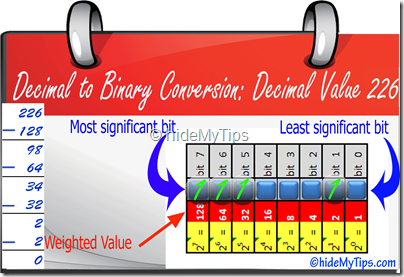
In this tutorial, we have to convert decimal value 226. First, we have to check which is greater weighted value of 226. But here we see, 128 is the highest value and so we choose 128 and put a binary 1 there. We also subtract the weighted value form the decimal value and get the result (226-128) = 98.

Convert Decimal 226 to Binary Step 1

The value 128 is bigger than 98 and so we choose 64 as it is just immediate of the higher value and put a binary 1 to that value. Now, we subtract that weighted value to get the result (98-64) = 34.

Convert Decimal 226 to Binary Step 2

Now, we need to compare 34 with the weighted bit position value and find 64 is the closest greater value with it. And so we choose 32 and put a binary 1 to that place. Later we subtract and get the result (34-32)=2.

Convert Decimal 226 to Binary Step 3

Now, we have the value 2 and we need to find just the immediate bigger value of 2 and get the value 4. So, we have to choose the weighted bit value position just before that and we get 2 and put binary 1 to that position. Now, we subtract and get the result = (2-2)=0.

Convert Decimal 226 to Binary Step 4

After doing the above steps, we get 0 lastly. So, we are now ready to put binary 0 to rest of the blank bit positions and finally we put binary 0 to those bits position.

Convert Decimal 226 to Binary Step 5

Doing the above steps, we can do easily convert the decimal value 226 following the above steps.

Final result,

  • Decimal value = 226

  • Binary value = 11100010

More Example to convert from decimal to binary:

Detail example to convert from decimal to binary (Converting 13 to binary)

In the tutorial How to Convert from Decimal to Binary Shortly & Efficiently? we discuss about the converting methods from decimal to binary. In this tutorial, we will discuss this with an example.

Fro example, we would like to convert decimal value 99 to binary. So, the steps are the followings:

Weighted-Value-of-Binary-Bits

Find which weighted value is bigger than 99. And we find 128. So, we have to take the weighted value just before 128 and so the weighted value should be 64. We would put a 1 to that 64 weighted value and subtract 64 from 99 and the final value should be 35.

Decimal to Binary Conversition of Decimal Value 13 Step 1

Now, we get the decimal value 35 and we again need to check which value is greater than that among the weighted values (128,64,32,16,8,4,2,1) and find that 64 is just greater than that. Before 64, the value is 32 and we now need to choose 32 value and put a 1 in the 32 weighted value. Subtract 32 from 35 and the value is 3. Now, in the next step we need to convert decimal value 3.

Decimal to Binary Conversition of Decimal Value 13 Step 2

Again we check which value is just greater than 3 and we get value 4. So, we choose just before 4 and the weighted value is 2 and put a 1 in that weighted field. Subtract 2 from 3 and we get result 1.Decimal to Binary Conversition of Decimal Value 13 Step 3

Now we need to convert decimal value 1 to binary. We again search which weighted value is just greater than 1 and we find 2. So, we choose 1 as weighted value 1 is just before the value 2 and put 1 in that bit position. Now, subtract 1 from 1, gives result 0. So, we no longer need to find any bit position values.Decimal to Binary Conversition of Decimal Value 13 Step 4

At last, put 0 all other bits position where we find any blank bits to get the final binary value.Decimal-to-Binary-Conversition-of-Decimal-Value-13-Step-5

Following the above steps, you can easily convert the decimal value 99 to binary value.

Final result,

  • Decimal value = 99
  • Binary value = 01100011

More Example to convert from decimal to binary:

How to Convert from Decimal to Binary Shortly & Efficiently?

The decimal (base ten) numeral system has ten possible values (0,1,2,3,4,5,6,7,8, or 9) for each place-value. In contrast, the binary (base two) numeral system has two possible values, often represented as 0 or 1, for each place-value.

Several ways are there to convert from decimal to binary. Our goal is to do it shortly and efficiently. Lots of techniques are available to do. Here, we will discuss the quick method to do it efficiently and hopefully for all (both for students and network engineers) it may be helpful.

SunRemember, to convert decimal to binary, we use two type of number systems:

  • Decimal number system:
      • base ten
      • possible values (0,1,2,3,4,5,6,7,8, or 9)
  • Binary number system:
      • base two
      • possible values (0 or 1)

Before doing this, first we need to remember the following table. Each IP has 4 octets and each octet has only 8 bits. One such octet is presented below and marked with each bit (8bits of a octet) by small blue rectangles. The right-most bit is the most least significant bit and the left-most bit is the most significant bit.

On the top of each blue square rectangle the no of bit position of that is depicted with dark ash boxes. There we see, the bits are started from 0 and ends with bit 7.

Below the square blue rectangles, the weighted value of those bits are presented for each bit position.

Weighted-Value-of-Binary-Bits

The above table is the base of any conversion of decimal to binary. So, remember it for all type of conversion.

Pointing upEach bit of the small square rectangle either contains 1 or 0

Pointing upIf 1 is there then the weighted value is there otherwise 0.

Methods to convert from decimal to binary:

Step 1: Start with the table of weighted value of binary bits.

Step 2: Take the decimal value and find which is immediate bigger weighted value with that value and choose the value just before of that weighted value.

Step 3: Subtract the chosen value with the decimal value

Step 4: Repeat step 2 and step 3 until  you get the subtracted value equal to zero (0).

Step 5: At last, put 0 to each of the blank bits

Examples to convert from decimal to binary: